No lead fees or subscription during launch
Joining is free and bidding is free during launch. You don’t pay to see a project or to bid on it.
BuildIt AI for contractors · Free during launch
Projects on BuildIt AI come with the homeowner’s photos, an AI design, a materials list, a budget range, and a timeline. See the scope before you drive out, and bid from your phone.



Same BuildIt AI app. Open it, and under “I am a...” tap Contractor
Planning your own remodel? BuildIt AI for homeowners
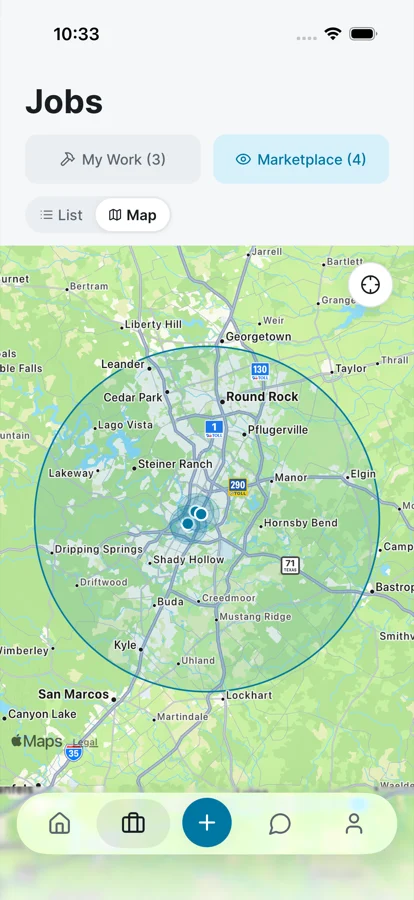
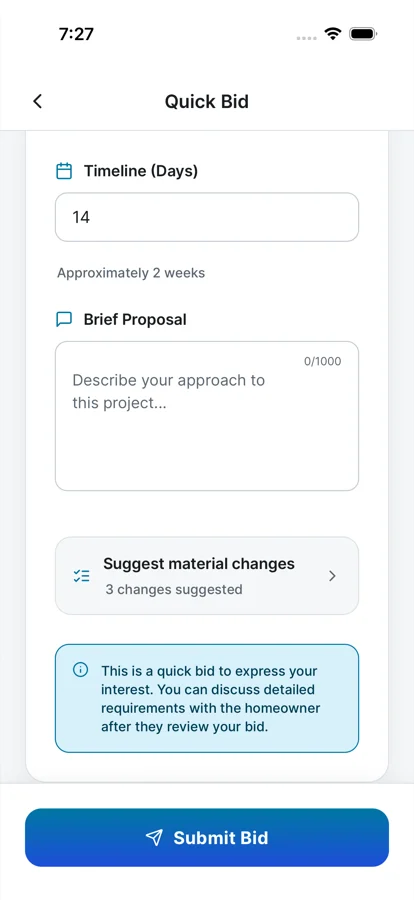
Example screens from the contractor side of the app.
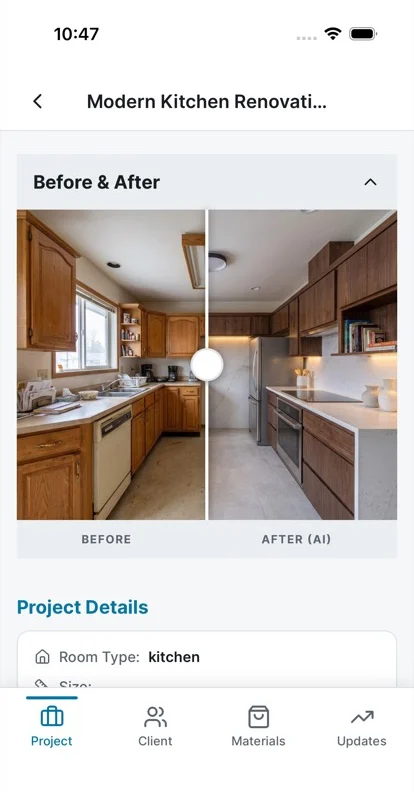
What you see before you bid
Every project arrives with the homeowner’s plan attached, so you know what they want before you bid.
The room as it is today next to the design the homeowner wants.
Know whether it fits your price range and your calendar before you call.
A starting point for your own takeoff, built from the design.
The city and roughly how far away it is, plus the job in the homeowner’s own words.
How it works
It’s the same app homeowners use. Under “I am a...” tap Contractor.
Add your business name, up to 10 trades, your ZIP, and a service radius of 10, 25, or 50 miles. Add your license number if you have one; it shows as self-reported.
Once homeowners in your area can post, you get a push notification for each new project inside your radius. Browse projects as a list on iPhone and Android, or on a map on iPhone.
Send an estimate, a timeline in days, and a short proposal. Suggest material swaps, removals, or additions with your reason. Once you’ve bid, you can message the homeowner.
Why it’s different
Joining is free and bidding is free during launch. You don’t pay to see a project or to bid on it.
Photos, the AI design, the materials list, the budget range, and the timeline are there before you pick up the phone.
Pick 10, 25, or 50 miles from your ZIP and the trades you do. You see projects inside that area.
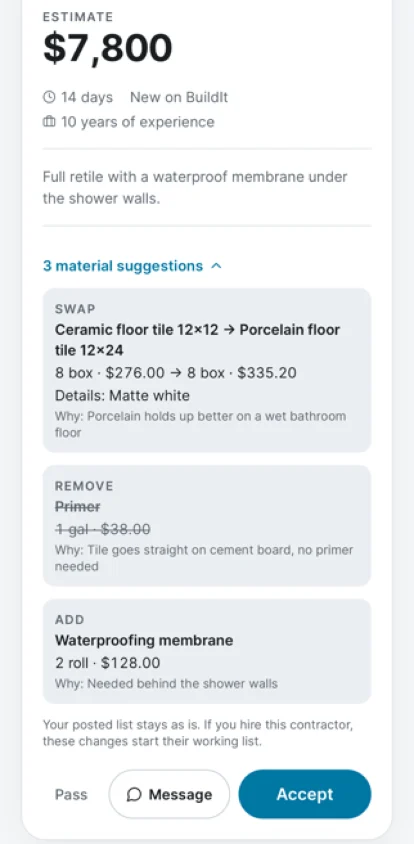
Swap, remove, or add items on the homeowner’s list and say why. They see each change with your reason.
Create your own AI designs in the app and send them with your bid, so the homeowner can see your idea, not just read it.
Message the homeowner once you’ve bid. Your public profile collects star reviews from the homeowners you work with.
Open your area
Contractors can sign up anywhere in the US. Homeowners in a ZIP can post projects for bids once two contractors who cover that ZIP have joined. Areas open as contractors sign up, so the first two are there from the day it opens.
Then open the app and tap Contractor under “I am a...”.
Know a contractor nearby? Send them to builditai.app/contractors. It takes two to open an area.
You see projects that match the work you do.
Joining is free, and bidding is free during launch: no lead fees, no subscription.
Anywhere in the US. You set your ZIP and a service radius of 10, 25, or 50 miles. Homeowners in a ZIP can post projects for bids once two contractors who cover it have joined, so areas open as contractors sign up.
The homeowner’s photo and AI design side by side, their budget range and timeline, the city and approximate distance, their description, and a materials list with estimated costs. You don’t see their street address.
Add your license number if you have one. It shows as self-reported; BuildIt AI does not verify licenses yet.
Once you’ve bid on their project. After that you can message each other in the app.
Both, in the same BuildIt AI app: App Store or Google Play. Nearby projects show as a list on both; the map view is on iPhone only.
Up to 10 of: Kitchen, Bathroom, Interior remodeling, Exterior, Landscaping, General contracting, Plumbing, Electrical, HVAC, Roofing, Flooring, and Painting.
Yes. Create your own AI designs in the app and send them with your bid.
Every contractor bids on the same design and materials list, so the homeowner compares like with like: your estimate, your timeline in days, your proposal, and any material changes you suggest with your reason. They can message the contractors who bid, then accept one.
Something else? Email [email protected].
Download BuildIt AI, tap Contractor, and set your trades and radius.
Planning your own remodel? See BuildIt AI for homeowners
Join freeNo lead fees at launch